Releasing nodes from backup storage
Backup storage is meant to provide access to one specific storage backend. If you need to switch the backend, for example, from a public cloud to a local storage cluster or one public cloud bucket to another, you need to delete the backup storage by releasing all its nodes from the backup storage cluster and create a new one.
When the backup storage is deleted, it is also unregistered from your Acronis backup software, which loses access to the storage backend.
Prerequisites
- The backup storage cluster is created and registered in the Cloud Management Panel, as described in Provisioning backup storage space.
To release nodes from backup storage
- Go to the Storage services > Backup storage > Nodes screen.
- Select one or more nodes to release, and then click Release. The backup storage will remain operational until there is at least one node in it.
-
If you select the last node to release from the backup storage:
-
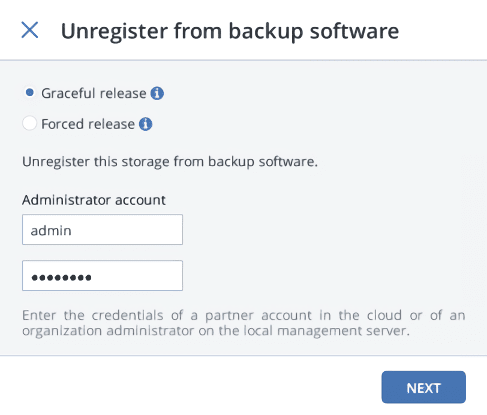
On the Unregister from backup software pane, select one of the following:
- Graceful release (recommended, see note below). Releases the node, deletes the Backup Gateway and unregisters it from your Acronis backup software.
-
Force release. Releases the node, deletes the Backup Gateway but does not unregister it from your Acronis backup software.
Select this option only if you are sure that the gateway has already been unregistered from your Acronis backup software. Otherwise, you will need to register a new gateway in your Acronis backup software and for that you will need to delete and recreate not just the Backup Gateway but also the entire storage cluster.
-
Specify the credentials of your administrator account in your Acronis backup software, and then click Next. In case the release is forced, simply click Next.
-