Manage Kubernetes clusters
In Acronis Cyber Infrastructure, Kubernetes clusters are created and managed by self-service users, as described in "Managing Kubernetes clusters" in the Self-Service Guide. In the admin panel, you can view Kubernetes cluster details and delete Kubernetes clusters.
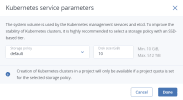
Additionaly, you can change the Kubernetes parameters such as the size and storage policy of the system volume on master nodes. The system volume is used by the Kubernetes management services and etcd. The new parameters will be applied only in new Kubernetes clusters. System volumes in existing Kubernetes clusters will retain their previous parameters. To improve the stability of Kubernetes clusters, it is highly recommended to select a storage policy with an SSD-based tier.
Prerequisites
- The compute cluster is created, as described in Creating the compute cluster.
- The Kubernetes service is installed during the compute cluster deployment or later, as described in Provisioning Kubernetes clusters.
To view the details of a Kubernetes cluster
On the Compute > Kubernetes screen, click a Kubernetes cluster to open its right pane.
To change the Kubernetes service parameters
- Click Settings on the Kubernetes clusters screen.
-
Set the desired storage policy and size for the system volume, and then click Done.

To delete a Kubernetes cluster
- On the Compute > Kubernetes screen, click a Kubernetes cluster.
- On the cluster right pane, click Delete.