Creating NFS exports
Prerequisites
- NFS shares are created, as described in Creating NFS shares.
To create NFS exports
- Create the root export:
- On the Storage services > NFS > Shares screen, click the number in the Exports column in the row of the desired share. This will open the share screen.
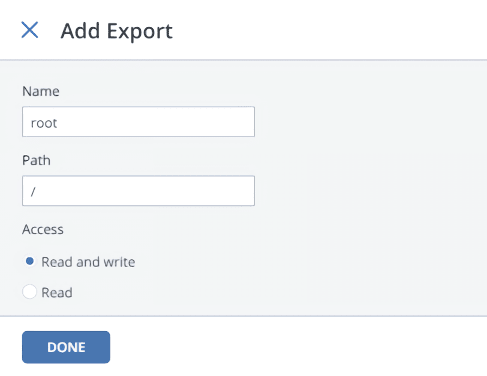
On the share screen, click Add export, specify root as the export name and / as path and select the Read and write access mode.
Do not use other names or paths for the root export.
This will create a directory with a default path that designates the export location inside the share. This path is automatically generated based on the share name and used (alongside the share’s IP address) to mount the export.
Do not give the users access to the root export.
The root export will be shown in the export list.
-
Mount the root export, as described in the Storage User’s Guide.
Do not mount NFS shares on cluster nodes. It may lead to node freeze.
- Create user exports in the mounted root export:
- In the mounted root export, create a subdirectory for a user export, for example, export1.
- On the share screen, click Add export, enter a user export name, specify /export1 as path, and select the access mode.
- Click Done.
The user export will appear in the export list.
 What's next